
How to Map and Cover a Fan-Out Query Cluster for Google AI Overviews: A Step-by-Step Workbook
Fan-out mechanics are covered elsewhere. This is the workbook: a repeatable method for mapping your own cluster and building the coverage that actually earns citations.
Aug 2026 · ~8 min readFan-out is easy to accept in theory and hard to act on. Google breaks one search into multiple related sub-queries behind the scenes (the mechanics are covered in full in how Google AI Overviews work, read that first if the term is new to you), and pages that rank for several of those sub-queries get cited far more often than pages that only rank for the head term. Knowing that changes nothing on its own. What changes something is a repeatable way to find your own cluster and actually build it, which is what this workbook is.
One thing worth carrying over from that guide: don’t chase fan-out queries as a fixed keyword list, they shift by user and context. Build broad topical coverage instead. Everything below is the method for doing that, not a re-explanation of why it works.
Step 1: Surface your own likely fan-out sub-queries
You can’t see Google’s actual fan-out queries for a given search. They’re not exposed anywhere, and they vary by user. What you can do is approximate the cluster a real fan-out process would likely touch, using signals that are public.
- “People also ask” boxes. Search your head term, expand every PAA result, then expand the follow-ups that appear inside each one. This alone usually surfaces a useful first batch of closely related questions, often well into the double digits for a broad head term, though the exact count varies a lot by topic.
- Related searches, at the bottom of the results page. These are a cruder signal than PAA, but worth scanning for angles PAA missed.
- Your own Search Console query data. If you already have a page ranking for the head term, pull every query that page gets impressions for, not just the one you targeted. That list is a real record of what Google already associates the page with, and a strong proxy for the fan-out cluster around it.
- A free “People also ask” aggregator tool, if you want a faster first pass than manually expanding boxes by hand. Several exist; any of them gets you a starting list to refine, not a finished one.
- What your competitors’ top-ranking pages on the same topic actually cover. If three competing pages all address a sub-question your draft doesn’t, that’s a reasonable signal it belongs in the fan-out cluster too.
Don’t stop at the first ten results. Surfer’s December 2025 study (173,902 URLs across 10,000 keywords) found a 0.77 correlation between how many fan-out queries a page ranks for and its odds of being cited, with pages ranking for at least one fan-out query 161% more likely to be cited than pages ranking only for the head term. Aim for real breadth here, not a token three-question FAQ bolted onto an otherwise narrow page.
Step 2: Decide what belongs on one page vs. what earns its own URL
Not every sub-question needs a dedicated page, and treating this as pillar vs. cluster architecture, the same model used across this site’s own guide clusters, keeps the decision straightforward.
If a sub-question can be answered in 2-4 sentences, it belongs as a subsection or FAQ entry on the main page, not a standalone URL. Splitting these out thins your own content and forces the model to jump between pages for something that should live in one place.
If a sub-question has real depth on its own, enough to justify 800+ words, a distinct search intent, or its own comparison or data, it’s a cluster page candidate, linked from the pillar and linking back to it.
Check for cannibalisation before creating a new page. If your existing content already answers a sub-question adequately somewhere else on the site, link to it rather than duplicating it on a new URL. Two thin pages competing for the same fan-out query serve the reader worse than one page that fully owns it. See my approach to cannibalisation in content planning for the underlying logic, applied here to a single topic instead of a whole site.
Step 3: Build the internal linking blueprint
Coverage that isn’t connected doesn’t function as a cluster. It’s just a pile of unrelated pages that happen to share a topic. Once you’ve mapped which sub-questions get their own page:
- 1Every cluster page links up to the pillar page, in the first or second paragraph, not buried in a footer list.
- 2The pillar page links down to every cluster page, ideally near the section that introduces the sub-topic, not dumped in a single “related articles” block at the bottom.
- 3Cluster pages link sideways to each other where relevant. A page on “pricing” naturally references a page on “alternatives,” for instance.
- 4Anchor text should describe the destination page’s actual question, not a generic “learn more.” This is a low-effort change with a real payoff for both crawlability and how cleanly the model can match a fan-out query to the right page.
Step 4: Verify with Google Search Console’s AI performance report
Google launched a dedicated AI performance report in Search Console on 3 June 2026, and it’s the first-party way to check whether any of this is actually translating into AI Overview appearances rather than guessing from a third-party study. One caveat before you rely on it: as of this piece’s publication the report only reports impressions, no click data, so it tells you whether you’re appearing, not whether that’s driving traffic. It launched with an initial rollout to a subset of UK-based sites before completing a full global rollout across every Search Console property by 11 August 2026, so if you didn’t have it on 3 June, check again now. Once your cluster is live and the report is available on your account:
- Filter the AI performance report by the pillar URL and each cluster URL individually, not just the site-wide total, so you can see which pages in the cluster are actually earning appearances and which aren’t pulling their weight.
- Compare appearances before and after publishing new cluster pages, giving Google a few weeks to index and start including the new URLs in its fan-out candidate pool.
- If a cluster page you expected to perform isn’t showing up at all, check it’s indexed and snippet-eligible first (the baseline requirement covered in the mechanics guide) before assuming the content itself is the problem.
Worked example: mapping a sample query
Take a head term like “AI visibility tracking tools.” A first-pass PAA and related-searches sweep might surface sub-questions like: what’s the difference between AI visibility and SEO rank tracking, how much do these tools cost, which one tracks ChatGPT specifically, can you track competitors as well as your own brand, do these tools integrate with existing analytics.
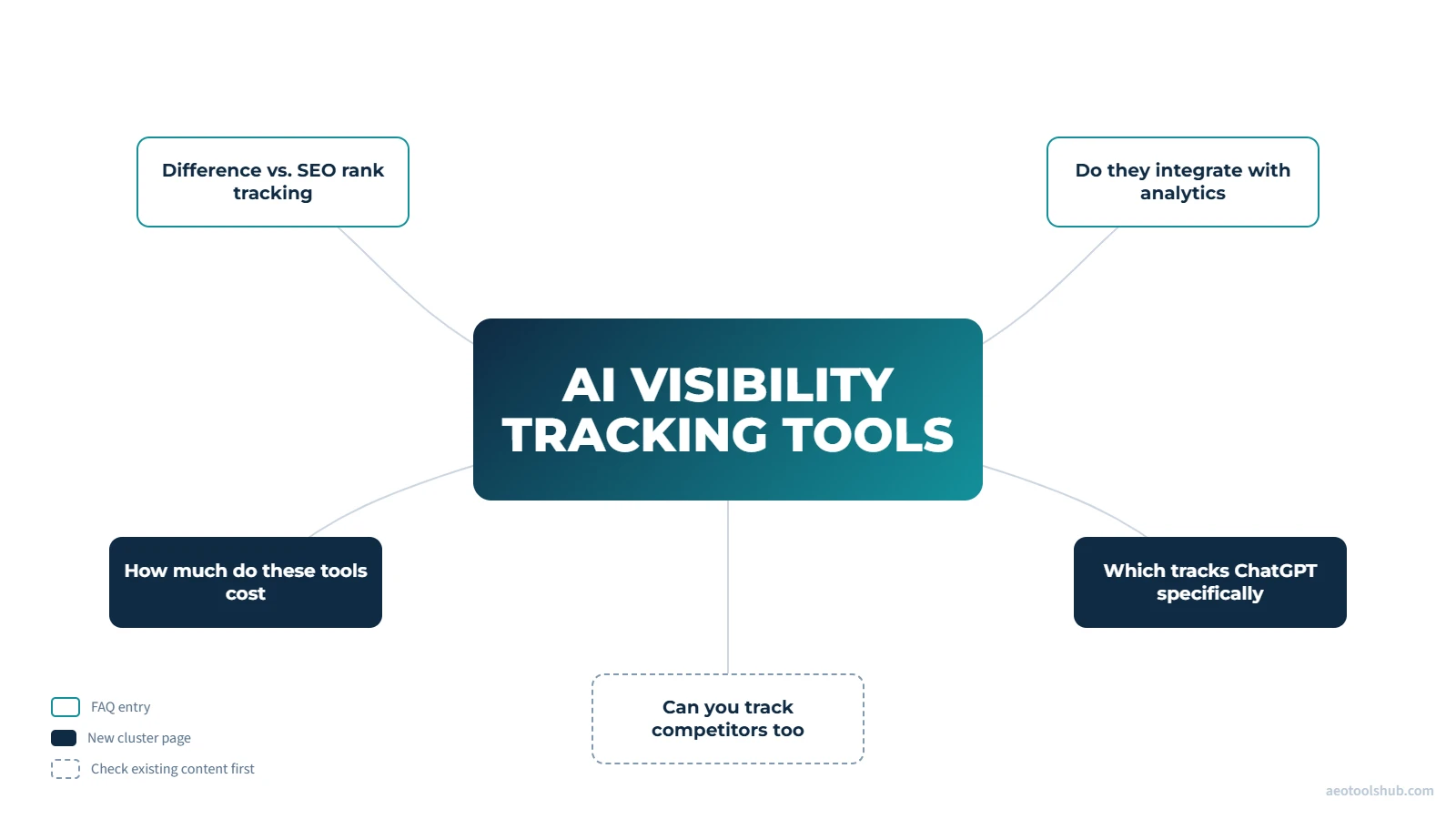
Applying Step 2: “what’s the difference from SEO tracking” and “do they integrate with analytics” are answerable in a few sentences each, so they become FAQ entries on the pillar. “How much do these tools cost” and “which one tracks ChatGPT specifically” have real standalone depth (pricing comparison, platform-specific coverage), so they’re candidates for their own cluster pages, if nothing on-site already covers them. “Can you track competitors” is worth checking against existing content before deciding either way.
That’s the whole method, applied to one term. Repeat it for every pillar page on the site that’s meant to be a real topical authority anchor, not just this one example.
Frequently asked questions
How often should I re-run the fan-out mapping for an existing pillar?
Whenever the topic shifts meaningfully, a new competitor, a platform change, a regulatory update, or at minimum once every few months for high-value pillars. Fan-out queries themselves are dynamic, so a mapping from a year ago is a starting point, not a finished list.
Is there a minimum number of cluster pages before this is worth doing?
No fixed number, but the underlying study data suggests the effect strengthens with breadth. Two or three cluster pages is a reasonable starting point to see any effect at all; in my own experience a comprehensive cluster for a genuinely competitive topic tends to run larger than that, though I don’t have a study to point to for a precise number, so treat this as a working rule of thumb rather than a benchmark.
Does this replace normal keyword research?
No, it complements it. Traditional keyword research tells you what has search volume. This method tells you what a fan-out process is likely to touch around a query you’ve already decided matters. Use both.
What if I don’t have Search Console access to the site I’m doing this for?
The mapping and content-architecture steps (1-3) don’t require it. Step 4 is specifically about verification once content is live, so it’s worth setting up access before you publish, since third-party AI visibility tools measure citation and mention patterns but won’t show you Google’s own AI performance data directly.
The honest test for an existing page
Take a pillar page you already published, run Step 1 against it, and count how many of the sub-questions it surfaces are actually answered somewhere on that page or its cluster. Most pages built before this kind of mapping was common cover the head term well and the surrounding cluster only by accident; if the count comes back low, that gap is exactly what Steps 2 through 4 are for.