
Schema Markup for AEO: Which Types Actually Matter
Most schema guides list every type schema.org offers and call it thorough. Here’s the organised version instead: which types apply to your kind of site, real working JSON-LD for the ones that matter most, and a reference table for the rest.
Aug 4, 2026 · ~13 min readSearch “complete schema markup guide” and you’ll find a list of thirty-plus schema.org types with a paragraph each. That’s not actually useful advice, because nobody tells you which of those thirty apply to your site. A blog needs a different set of types from an online shop, which needs a different set again from a local clinic or an events page. This guide is organised around that instead: what schema does for AI specifically, which types matter for your kind of site, and working JSON-LD for the ones that carry the most weight.
Which types apply to your site
Start here. Find the row (or rows, most sites need more than one) that matches what you’re running, then jump to that section below. Everything with a full worked example gets its own heading further down; everything else gets a short reference entry with a link to Google’s own docs.
| If you’re running… | Start with |
|---|---|
| Any site | Organization, BreadcrumbList |
| A blog or content site | Article, FAQPage, HowTo |
| An online shop | Product, Offer, Review / AggregateRating |
| A local or service business | LocalBusiness |
| An events page | Event |
| A sports team or fixtures page | SportsEvent, SportsTeam |
| A recipe or food site | Recipe |
| A job board or careers page | JobPosting |
| Software or a SaaS product | SoftwareApplication |
| Video or media content | VideoObject |
| Courses or educational content | Course |
| A review site or marketplace | Review, AggregateRating |
What schema actually does, and what it doesn’t
Schema markup doesn’t make AI engines cite you. It doesn’t boost rankings on its own, and it isn’t a ranking factor in the way some older SEO advice implies. What it does is remove ambiguity: instead of an AI engine or a crawler having to infer that a page is an article, who wrote it, and what organisation stands behind it, structured data states it directly, in a format machines parse without guessing.
That distinction matters because of a real change that happened this year. Google stopped showing FAQ dropdown rich results in Search entirely as of 7 May 2026, with the Rich Results Test and Search Console support for FAQ following shortly after.1 If you thought of FAQPage schema purely as a way to win that dropdown, this looks like the end of the tactic. Google’s own guidance says leaving FAQPage markup in place doesn’t cause any problem for the page even though it’s no longer used for the visual snippet, and FAQPage remains a fully valid schema.org type. Every AI engine outside Google’s own search product was never rendering that dropdown to begin with, they read the Q&A content directly.1 Keep this distinction in mind for every type below: some schema exists to win a specific SERP feature, and some schema exists to help any machine (Google’s or not) understand your content. AEO cares mostly about the second kind.
The universal starting point
These five apply almost regardless of what you’re running, they’re the baseline every site should have before worrying about anything more specific.
Article (or BlogPosting)
Covers every guide on this site. The detail most schema guides get wrong: Google requires no properties at all for Article schema, headline, image, author, datePublished and dateModified are all listed as “recommended,” never mandatory.2 Include them anyway, since they’re exactly the fields that help an AI engine attribute a claim to a specific author and date, which matters for anything time-sensitive.
{
  "@context": "https://schema.org",
  "@type": "BlogPosting",
  "headline": "Schema Markup for AEO: Which Types Actually Matter",
  "image": "https://aeotoolshub.com/wp-content/uploads/schema-aeo-featured.webp",
  "author": {
    "@type": "Person",
    "name": "Gino Romagnuolo"
  },
  "datePublished": "2026-08-04",
  "dateModified": "2026-08-04",
  "publisher": {
    "@type": "Organization",
    "name": "AEOToolsHub",
    "logo": {
      "@type": "ImageObject",
      "url": "https://aeotoolshub.com/wp-content/uploads/aeotoolshub-logo.png"
    }
  }
}
FAQPage
Covered in full in my guide to getting cited by AI search engines, still relevant here: still valid, still useful, just no longer chasing a visible Google dropdown.
{
  "@context": "https://schema.org",
  "@type": "FAQPage",
  "mainEntity": [
    {
      "@type": "Question",
      "name": "Does vitamin C serum actually work?",
      "acceptedAnswer": {
        "@type": "Answer",
        "text": "Yes, topical vitamin C is effective for most skin types at 10-20% concentration, with the strongest evidence for brightening tone and supporting collagen production."
      }
    }
  ]
}
Organization
Also required-property-free according to Google, name, url, logo, address and sameAs are all “recommended.”3 The sameAs array matters more for AEO than most sites realise: it’s how you link your site to your other verified profiles (LinkedIn, Crunchbase, Wikidata if you have an entry), which is one of the entity-resolution signals covered in more depth elsewhere on this site.
{
  "@context": "https://schema.org",
  "@type": "Organization",
  "name": "AEOToolsHub",
  "url": "https://aeotoolshub.com",
  "logo": "https://aeotoolshub.com/wp-content/uploads/aeotoolshub-logo.png",
  "sameAs": [
    "https://www.linkedin.com/company/aeotoolshub"
  ]
}
HowTo
Google restricted HowTo rich results to desktop only in August 2023, then removed them from Search entirely the following month, they haven’t come back since.4 Zero SERP value doesn’t mean zero AEO value though, a clearly numbered HowTo structure is exactly the kind of self-contained, step-by-step passage an AI engine can lift cleanly, schema or not.
{
  "@context": "https://schema.org",
  "@type": "HowTo",
  "name": "How to introduce a new vitamin C serum into your routine",
  "step": [
    { "@type": "HowToStep", "text": "Patch test on your inner arm for 24 hours before applying to your face." },
    { "@type": "HowToStep", "text": "Apply every other night for the first two weeks to check tolerance." },
    { "@type": "HowToStep", "text": "Increase to nightly use once no irritation appears." }
  ]
}
BreadcrumbList
The one type on this list you rarely have to write yourself. On this site, Rank Math generates BreadcrumbList automatically on every page regardless of the Schema tab’s setting, confirmed directly against a live page’s rendered JSON-LD. Good to know it exists and what it looks like, though not something you need to hand-author.
{
  "@context": "https://schema.org",
  "@type": "BreadcrumbList",
  "itemListElement": [
    { "@type": "ListItem", "position": 1, "name": "Guides", "item": "https://aeotoolshub.com/guides/" },
    { "@type": "ListItem", "position": 2, "name": "AEO", "item": "https://aeotoolshub.com/guides/aeo/" },
    { "@type": "ListItem", "position": 3, "name": "Schema Markup for AEO" }
  ]
}
The types that matter for your specific site
These are the ones that get a full worked example, picked because they cover the site types most readers here actually run.
Product
Product schema is what makes an online shop’s own pages eligible for the standard product rich result, price, availability and rating shown directly under the listing. Easy to mix up with something else: Product schema is JSON-LD you add to your own page, no account required anywhere. Merchant listings, the shopping-style results with your logo and prices compared across retailers, pull from a completely different source, a product feed submitted through Google Merchant Center. Most shops eventually want both, but they’re not the same mechanism, and you don’t need the second to get the first.
Google requires name and image at minimum, plus at least one of offers, review or aggregateRating, a product page with none of those three simply doesn’t qualify.5 Include offers and price plus priceCurrency become required inside it. Include aggregateRating and ratingValue plus reviewCount become required inside that.
{
  "@context": "https://schema.org",
  "@type": "Product",
  "name": "Vitamin C Brightening Serum",
  "image": "https://example.com/images/vitamin-c-serum.webp",
  "description": "10% vitamin C serum for brightening and evening out skin tone.",
  "sku": "VCS-30ML",
  "brand": {
    "@type": "Brand",
    "name": "Example Skincare Co."
  },
  "offers": {
    "@type": "Offer",
    "url": "https://example.com/products/vitamin-c-serum",
    "priceCurrency": "GBP",
    "price": "28.00",
    "availability": "https://schema.org/InStock"
  },
  "aggregateRating": {
    "@type": "AggregateRating",
    "ratingValue": "4.6",
    "reviewCount": "212"
  }
}
One honest caveat, since it trips people up: the ratingValue and reviewCount in your markup have to match what a visitor actually sees on the page, and Google has been explicit that fake or undisclosed incentivised reviews, in the visible content or the schema, trigger a manual action that strips every rich result from the site, not just the one page.6
LocalBusiness
LocalBusiness is what gets your opening hours, address and phone number pulled directly into search results, and it only fits businesses with an actual physical presence or service area. Google requires just name and address. Go a step further though: use the most specific subtype you can, Restaurant, DaySpa, HealthClub, and so on, there are dozens, rather than the generic LocalBusiness type. It’s Google’s own recommendation, and it also unlocks subtype-specific properties you’ll want to include.7 Since LocalBusiness is technically a subtype of Organization, the Organization properties covered above apply here too.
{
  "@context": "https://schema.org",
  "@type": "DaySpa",
  "name": "Example Skincare Clinic",
  "image": "https://example.com/images/clinic-exterior.webp",
  "address": {
    "@type": "PostalAddress",
    "streetAddress": "22 High Street",
    "addressLocality": "Manchester",
    "postalCode": "M1 1AE",
    "addressCountry": "GB"
  },
  "telephone": "+44 161 496 0000",
  "openingHoursSpecification": {
    "@type": "OpeningHoursSpecification",
    "dayOfWeek": ["Monday", "Tuesday", "Wednesday", "Thursday", "Friday"],
    "opens": "09:00",
    "closes": "18:00"
  }
}
Event
Event schema covers anything with a date, a time and a location, a workshop, a launch, a conference, a pop-up. Three properties are required: name, startDate in full ISO 8601 format with a timezone offset, and location with a proper address nested inside.8 Skip the timezone offset on startDate and the date can render wrong for anyone outside your own timezone, a genuinely easy mistake to make.
{
  "@context": "https://schema.org",
  "@type": "Event",
  "name": "Skincare Ingredients Masterclass",
  "startDate": "2026-09-12T18:00:00+01:00",
  "endDate": "2026-09-12T20:00:00+01:00",
  "eventAttendanceMode": "https://schema.org/OfflineEventAttendanceMode",
  "location": {
    "@type": "Place",
    "name": "Example Skincare Studio",
    "address": {
      "@type": "PostalAddress",
      "streetAddress": "22 High Street",
      "addressLocality": "Manchester",
      "postalCode": "M1 1AE",
      "addressCountry": "GB"
    }
  },
  "offers": {
    "@type": "Offer",
    "url": "https://example.com/events/ingredients-masterclass",
    "price": "15.00",
    "priceCurrency": "GBP",
    "availability": "https://schema.org/InStock"
  }
}
Sports
Sports splits across two branches that are easy to confuse, because they answer different questions. A specific match or fixture is an SportsEvent, a subtype of Event that adds a competitor property for the teams involved. A team’s own page, roster and league, is a SportsTeam instead, a subtype of Organization, not Event. Mark up a fixtures page as a team or a roster page as an event and you’ve mismatched the content to the type, the same mistake covered in what to skip further down. Neither has a dedicated Google rich result the way Product or Event does, so the value here is squarely for AI engines parsing who’s playing whom, not a SERP payoff.
{
  "@context": "https://schema.org",
  "@type": "SportsEvent",
  "name": "Kaunas City FC vs Riverside United",
  "startDate": "2026-09-20T15:00:00+03:00",
  "location": {
    "@type": "Place",
    "name": "Example Municipal Stadium",
    "address": {
      "@type": "PostalAddress",
      "addressLocality": "Kaunas",
      "addressCountry": "LT"
    }
  },
  "competitor": [
    { "@type": "SportsTeam", "name": "Kaunas City FC" },
    { "@type": "SportsTeam", "name": "Riverside United" }
  ]
}
Other schema types to consider
These didn’t earn a full worked example, either because they’re narrower in who needs them or because Google’s own documentation already covers the implementation well. Add a type here because your content genuinely is that type.
| Type | When you need it |
|---|---|
| Recipe | Any page that is, specifically, a recipe with ingredients and steps. See Google’s Recipe docs. |
| JobPosting | Individual job listing pages on a careers site or job board. See Google’s JobPosting docs. |
| SoftwareApplication | A page for a specific app, plugin or piece of software, not a SaaS company’s homepage in general. See Google’s Software App docs. |
| VideoObject | Any page where a video is the primary content, not a decorative background clip. See Google’s Video docs. |
| Course | A specific course listing with a defined provider and, ideally, instances with dates. See Google’s Course docs. |
| Review / AggregateRating (standalone) | Review sites and marketplaces reviewing something else’s product or service, as opposed to a shop reviewing its own. See Google’s Review Snippet docs. |
Stacking multiple types on one page
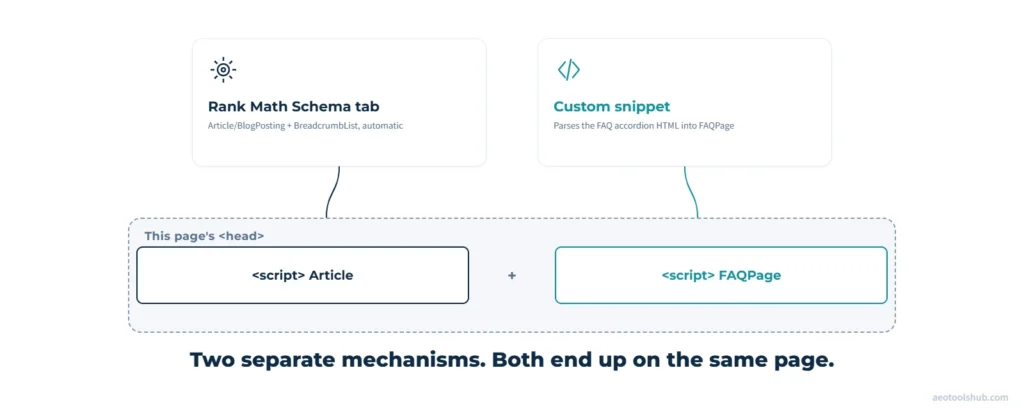
The broader point holds regardless of platform: nothing in the schema.org spec limits a page to one type, JSON-LD supports multiple nodes in a single @graph, so a page can legitimately carry an Article node, an FAQPage node and a BreadcrumbList node all at once. Most CMSs and SEO tools just default to exposing a single “primary type” picker in their UI, which is where the one-type-per-page myth comes from. On this site specifically, running WordPress with Rank Math free, the “pick one type” restriction only applies to the single Schema tab dropdown, set to Article/BlogPosting here. The FAQPage schema on this page doesn’t come from that dropdown at all: the FAQ sections here are a hand-written HTML accordion rather than Rank Math’s native FAQ block, so I built a small snippet that parses that markup and outputs a separate, standalone FAQPage script tag alongside whatever the Schema tab already set. Different mechanism, same net result, both nodes end up in the page’s structured data, just added independently rather than nested in one @graph. If you do use Rank Math’s native FAQ or HowTo block instead of hand-written markup, that block generates and auto-nests its own schema for you with no extra step, the simpler default either way. You can still style it with custom CSS, or turn it into an accordion with a small CSS/JS snippet, the real trade-off is that you start from Rank Math’s own markup structure rather than writing the HTML yourself. If you’re on a different CMS, check whether your SEO plugin or theme does the same auto-nesting, or whether you’ll need to add the extra schema types by hand.
Testing what you’ve built
Two tools, used for different jobs. Google’s Rich Results Test checks whether your markup is eligible for an actual Google rich result, genuinely useful for Article, Product, LocalBusiness and Event, no longer meaningful for HowTo or FAQPage since Google retired both rich result types from Search entirely, and SportsEvent was never eligible in the first place. The Schema Markup Validator checks pure schema.org syntax validity regardless of what Google does with it, the better tool for confirming your HowTo, FAQPage or Organization markup is technically correct even without a Google rich-result payoff attached.
Paste your page URL or raw JSON-LD into either tool before publishing. Both will flag missing required properties and malformed JSON immediately, catching the kind of typo (a missing comma, a mismatched bracket) that silently breaks structured data without breaking the visible page at all.
What to skip
None of the above means bolting every type from the table onto your homepage. The principle cuts the other way: add a type because your content genuinely is that type, never to look more “optimised.” Product schema requires name plus at least one of review, aggregateRating or offers, real requirements that simply don’t fit a page with nothing for sale.5 That’s exactly why AEOToolsHub itself carries no Product schema anywhere, even though the type is genuinely useful if you run a shop. Review, Event, Recipe and the rest only belong on pages that actually are a review, an event listing or a recipe. Marking up content as something it isn’t produces schema that’s technically present and semantically false, which is worse than no schema at all.
FAQ
Does adding more schema types improve my AI citation rate?
Not directly, and not in a “more is better” way. Schema removes ambiguity about what a page is and who’s behind it, it doesn’t act as a ranking or citation multiplier on its own. Adding schema for content types you don’t actually have does nothing useful and can create validation errors.
Should you remove FAQPage schema now that the Google dropdown is gone?
Only if you were maintaining it purely for that dropdown. If the FAQ content itself is useful to readers or gets picked up by AI engines reading the page directly, the schema costs nothing to keep and still helps machines parse the Q&A structure.
Can I use Google’s Rich Results Test to check FAQPage schema now?
You can run it, but it won’t show FAQ-specific rich-result eligibility anymore since that feature was retired. Use the Schema Markup Validator instead if you specifically want to confirm FAQPage syntax is correct.
Do I need a developer to add multiple schema types to one page?
Not for the common combinations. On Rank Math, the Schema tab’s primary type plus the native FAQ block and HowTo block all nest together automatically. A custom code filter is only needed for types with no native block, like Review or Product.
Do I need Google Merchant Center to use Product schema?
No. On-page Product JSON-LD and Merchant Center are two different mechanisms that happen to overlap. Product schema on your own pages is enough for the standard product rich result and for AI engines to understand what you sell, no account required. Merchant listings pull from a separate product feed submitted through Merchant Center instead. Most shops want both eventually, but you don’t need the second to get the first.
My business is fully online with no physical address, should I still use LocalBusiness?
No, use Organization instead. LocalBusiness requires a real address as one of its two required properties, so a remote or online-only business isn’t actually a LocalBusiness by schema.org’s own definition. Add areaServed to Organization if you want to signal which regions you cover without claiming a physical location you don’t have.
Do I need separate schema for a sports team page and a match or fixture page?
Yes, they’re different types. A roster or league page is a SportsTeam, an Organization subtype. A specific match is a SportsEvent, an Event subtype that references the competing SportsTeams. Marking up a fixtures page as SportsTeam, or a roster as SportsEvent, is exactly the mismatched-schema mistake covered under what to skip above.