
Peec.ai Review: The AI Visibility Tool I Actually Pay For (2026)
A hands-on review of Peec.ai, the AI visibility platform I use daily on a real, paid agency account, not a rushed free trial. Pricing, setup, every module, and where it is still rough around the edges.
Jul 14, 2026 · ~17 min readPeec.ai tracks how often, where, and how favourably a brand shows up inside AI answers: ChatGPT, Perplexity, Google AI Overview and AI Mode, Gemini, Microsoft Copilot, and on the top tier, Claude, GPT-5 Search, DeepSeek, Qwen and Mistral through their APIs. You give it prompts your customers might actually type, it runs them against the engines you choose, and it tells you whether you showed up, where you ranked, what tone the answer took, and, this is the part that matters, what sources the AI cited instead of you.
This review is part of a series covering the AI visibility category. Most of the other tools in that series get tested through a free trial where one is available, or desk research where it isn’t (Profound, for instance, is demo-only, and Semrush’s AI Visibility Toolkit requires an active Semrush plan). Peec.ai is first in the series for a different reason: it’s the tool I use daily on real client work, not a rushed trial account. Everything below comes from an active, paid, agency-tier account, plus a neutral benchmark brand (The Inkey List, UK skincare, tracked against a competitive set that grew from 4 to 7 brands on its own, more on that below) set up specifically so this review doesn’t expose a real client’s data.
Quick take before the detail: 5 out of 5. Not because it’s flawless (the export flow needs a caveat, see the verdict at the end), but because nothing else in this category moves this fast or shows this much of what’s actually happening inside an AI answer. I’d recommend it to small Amazon sellers, small-medium agencies, solo freelancers, and enterprise teams alike. There’s a plan shape for each of them.
Pricing
Peec runs two separate pricing tracks, and which one applies to you depends on whether you’re buying for one brand or managing several. The split is clearly signposted on the site itself, brand pricing and agency pricing are two different pages with a direct link between them, so there’s no ambiguity once you’re there.
Pricing for Brands
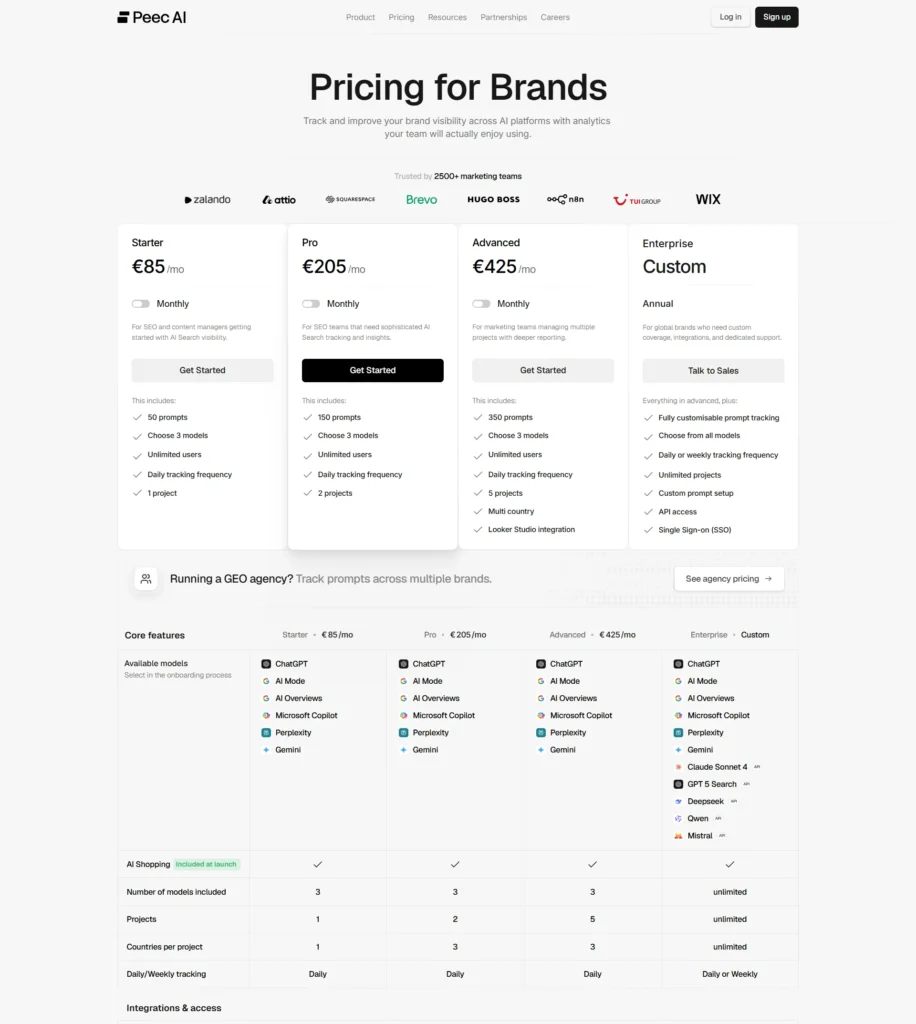
Starter runs €85 a month for 50 prompts, a choice of 3 models, unlimited users, daily tracking, and 1 project. Pro is €205 a month for 150 prompts and 2 projects. Advanced is €425 a month for 350 prompts and 5 projects. Enterprise is custom, with fully customisable prompt tracking, every model available, daily or weekly frequency, unlimited projects, API access, and SSO.
A few details that only show up in the full comparison table, not the plan cards: countries per project go 1 on Starter, 3 on Pro, 3 on Advanced, unlimited on Enterprise, so multi-country tracking actually starts at Pro even though only the Advanced card mentions it up front. MCP integration is included on every tier, even Starter. API access and SSO stay Enterprise-only. A custom onboarding call is only included from Advanced up; below that, support is chat-based (Starter) or chat plus email (Pro and Advanced). If 3 models isn’t enough, every tier can add more without upgrading: extra models cost €30 a month on Starter, €70 on Pro, €140 on Advanced.
Pricing for Agencies
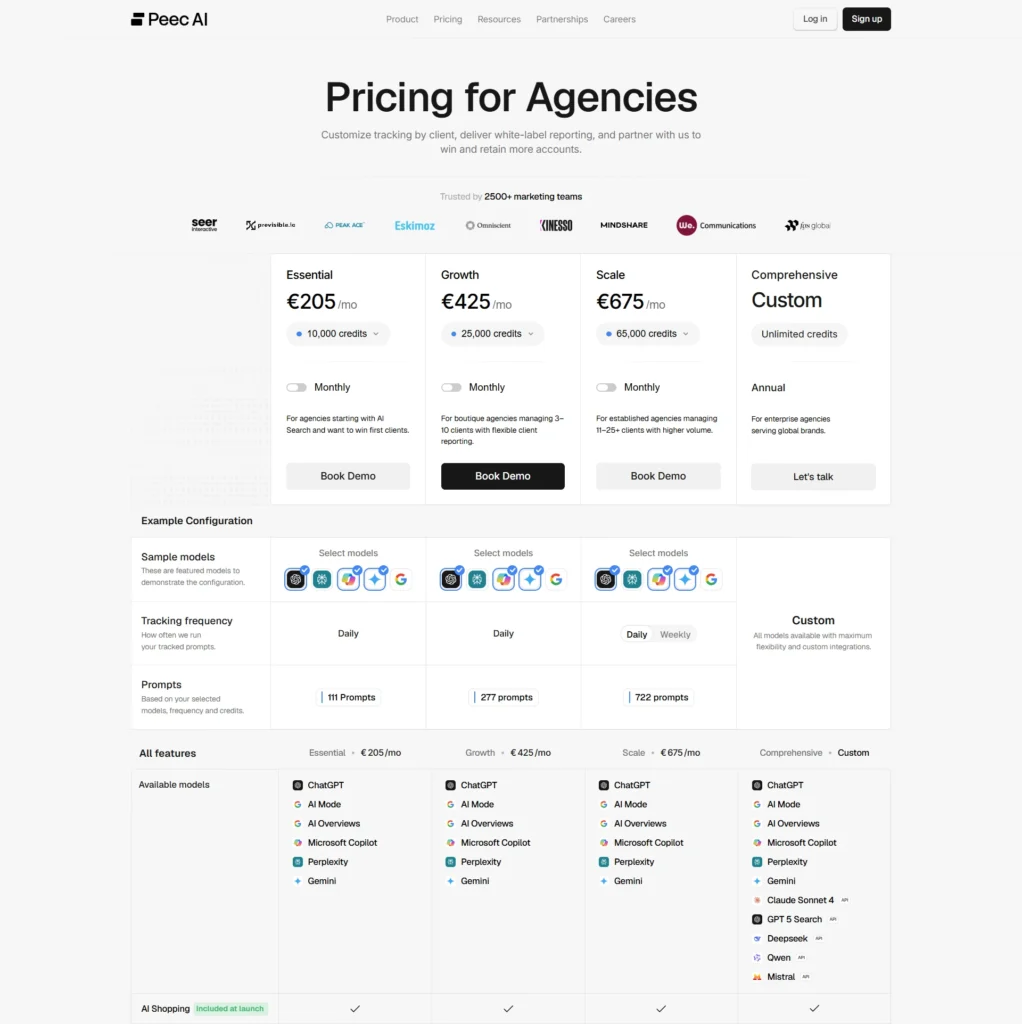
The credit formula is worth understanding before the numbers below make more sense: one prompt, times one model, times one day, equals one credit. Credits are allocation slots, not a spending budget. They don’t get consumed or reset monthly, they just sit assigned to a project until you change them, and the minimum per project is 900 credits.
This is the track that applies to most readers of this review. Essential is €205 a month for 10,000 credits, which works out to roughly 111 prompts tracked daily across 3 models, 3 projects, and 3 pitch projects at 25 prompts each. Growth is €425 for 25,000 credits (about 277 prompts, 10 projects, 5 pitch projects at 50 prompts). Scale is €675 for 65,000 credits (about 722 prompts, 25 projects, 7 pitch projects at 75 prompts, plus a weekly tracking option that costs a third of the daily credit rate). Comprehensive is custom and unlocks the five API-tier models on top of everything else.
One real gap between the two tracks: multi-country tracking is a no on Essential and a yes from Growth up. If you’re running a single-country agency book, Essential is fine. If any client needs more than one market, budget for Growth. Looker integration, API access, and MCP integration are included on every agency tier, including Essential, which is more generous than the Brand track.
Pitch projects: the mechanic unique to the agency track
Agency plans split projects into two pools that behave differently. Customer projects draw from the shared credit pool described above. Pitch projects are a separate, plan-capped allocation meant purely for prospecting, building a data-backed pitch for a client you haven’t signed yet, and they don’t touch your paying clients’ credits at all. The benchmark project behind every number in this review is a pitch project, which is exactly why setting it up never came close to my real account’s allocation.
Setting up a project
From what I remember setting this up the first time, back in early 2025 when Peec had only been on the market a few weeks (this is a young company, they only launched in February 2025): a short demo call, then a free trial (agencies get some flexibility on length if you need a few extra days), then an optional onboarding call to help configure the first project if you want the help. For brand accounts the process is lighter, and a custom onboarding call is only bundled in from the Advanced plan up, as shown in the comparison table above.
Model selection is where Peec’s own interface undersells itself. Every plan, including the cheapest one, lets you actively track 3 models at a time out of 6 standard options: ChatGPT, Google AI Mode, Google AI Overviews, Microsoft Copilot, Perplexity, and Gemini. The ones you’re not tracking look greyed out and locked in the picker. They’re not. You can deselect any of your 3 active picks and swap in any of the other 5, free, on any plan, any time. Peec’s own FAQ confirms it: “Adding or removing models will automatically adjust the credits assigned to that project.” The only models genuinely gated behind a paywall are the five API-tier ones (Claude Sonnet 4, GPT-5 Search, DeepSeek, Qwen, Mistral), and those need the top Comprehensive or Enterprise plan specifically.
For this benchmark I picked ChatGPT, Perplexity, and Google AI Overview as the active three, a deliberate choice to match where a UK skincare shopper actually searches, not a plan ceiling.
General
Overview
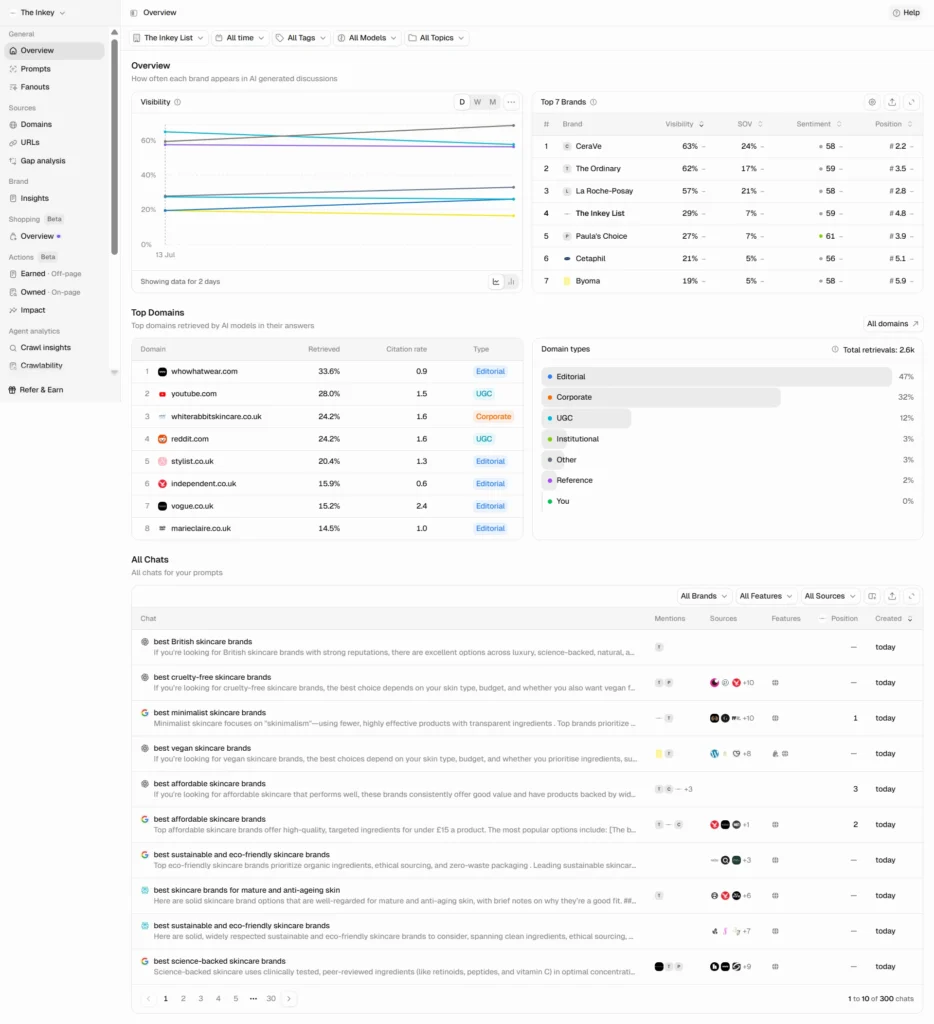
Overview is the first thing in the nav and it’s easy to skip past on the way to your own numbers, which would be a mistake. It’s a market-level view: every tracked brand ranked by visibility, share of voice, sentiment and position, the domains AI models cite most across the whole category, and a breakdown of domain types (editorial, corporate, UGC, and so on). I started this benchmark with 4 competitors. By the time this was checked, Overview was showing 7, Peec suggests additional competitors on its own as it gathers data, and two more (Cetaphil, Byoma) had been added without me doing anything manually.
The bottom of the page lists every chat behind every prompt, filterable by brand, feature (web search, shopping, product comparison, ads, maps), and source. It’s the rawest layer Peec offers, useful when a number looks off and you want to see the actual AI conversation behind it.
Prompts
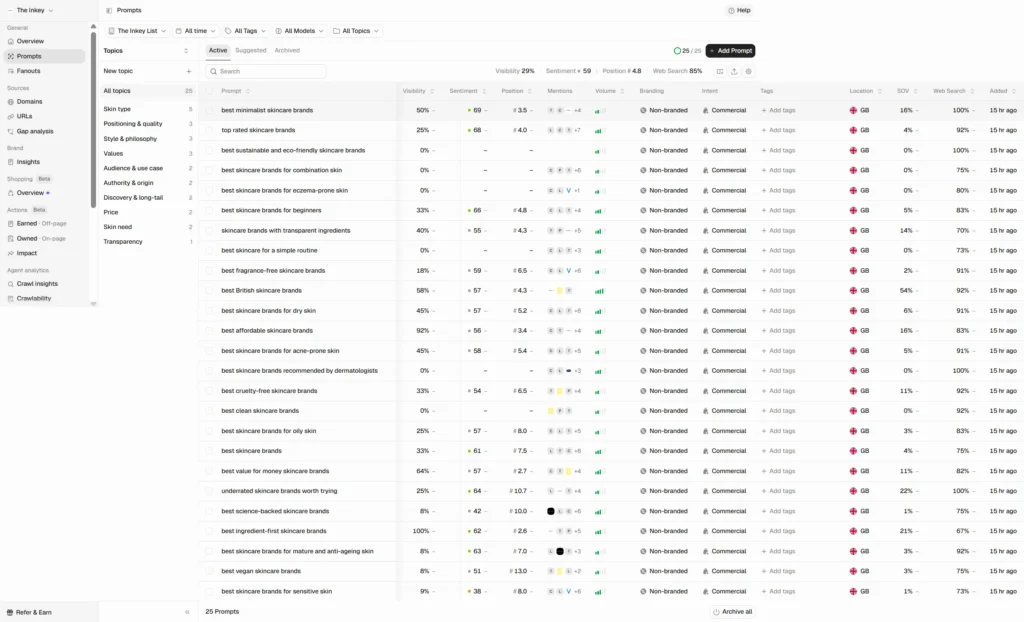
This is the working view for day-to-day monitoring. Every prompt gets its own row with visibility, sentiment, position, mentions, search volume, a branded/non-branded tag, an intent tag (informational, commercial, transactional), and a web search percentage showing how often the model actually left its training data to answer. Prompts are auto-classified on both dimensions, so slicing visibility by buyer intent takes a couple of clicks instead of a manual tagging pass.
Worth flagging honestly: visibility isn’t flat across topics. Several prompts sat at 0% for the benchmark brand while others cleared 50%. Anyone presenting Peec data to a client should lead with the topic-by-topic table, not the headline average.
There’s also a newer, early-access addition here worth a mention: Prompt Builder. Instead of writing prompts one at a time, you feed it your services, the personas you sell to, and any extra business context, and it generates a fuller prompt set from that. I didn’t run it for this benchmark since my 25 prompts were already fixed by the review protocol, but it’s a genuinely useful shortcut for a fresh project.
Fanouts
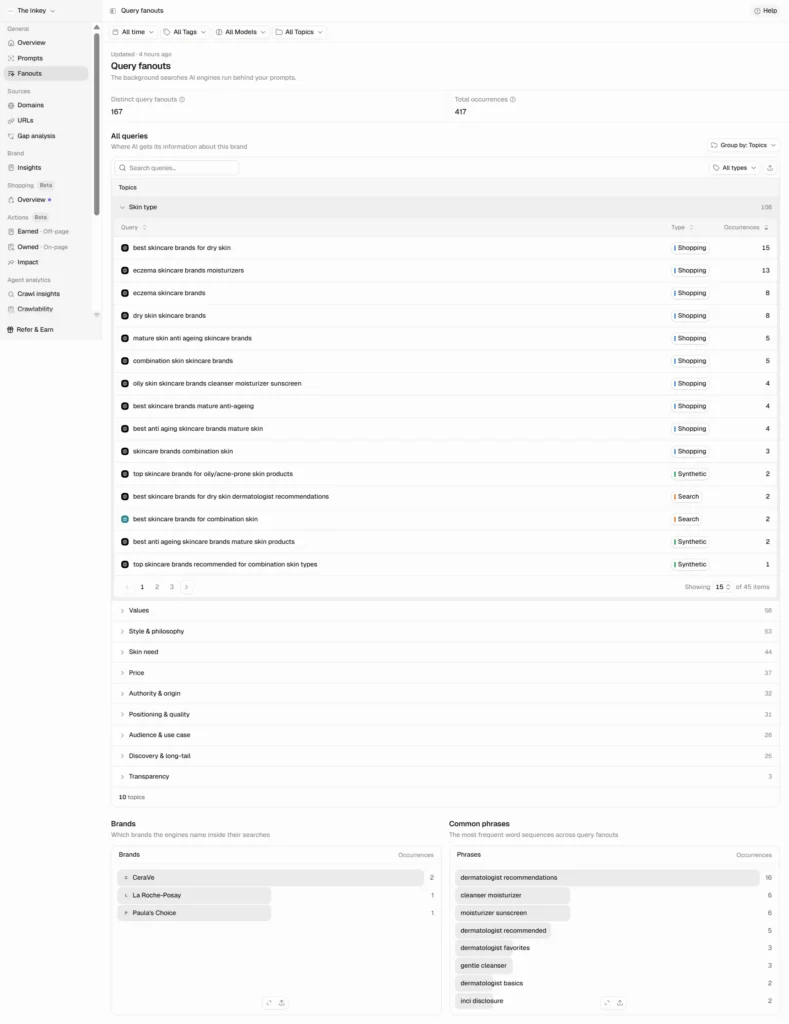
AI engines don’t answer a prompt directly, they run their own background searches first and write the answer from what they find. Fanouts makes those searches visible: 167 distinct fanout queries and 417 total occurrences on this project alone, grouped by topic, with the brands and phrases that show up most often inside them. It’s effectively automating what used to require manually intercepting network requests in DevTools, and it’s one of the more genuinely novel ideas in the product.
Sources
Domains
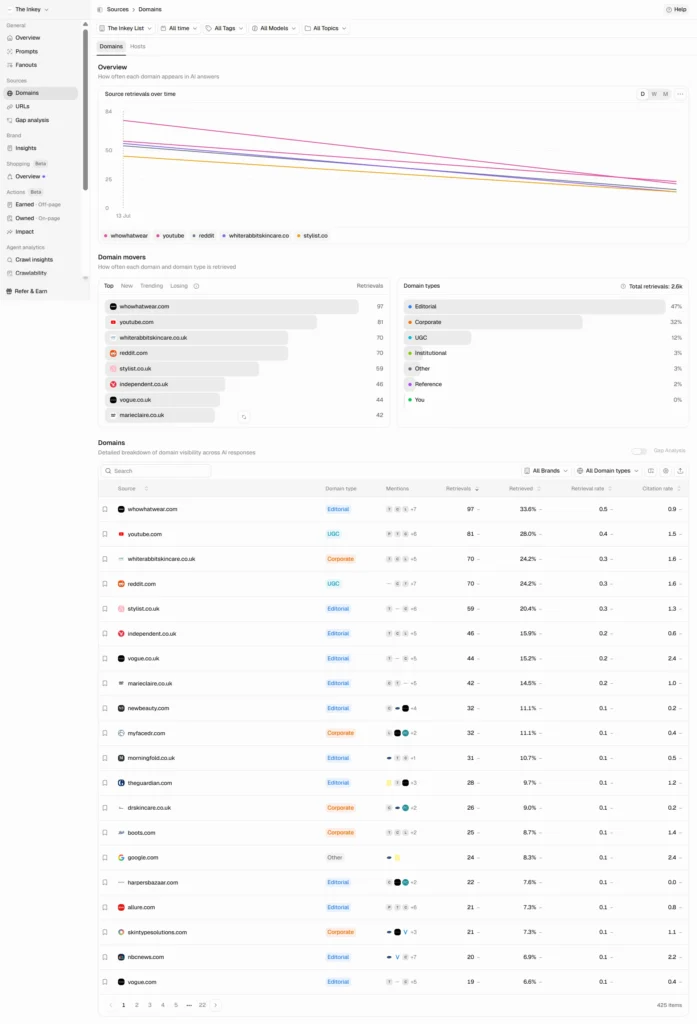
Domains and URLs work the same way at different levels of granularity. Domains rolls citations up to the publisher level (whowhatwear.com, youtube.com, reddit.com, and so on for this benchmark), with retrieval rate, citation rate, mentions, and a domain-type classification. URLs does the same thing at the page level, which is where you’d go to find the exact article driving a competitor’s citations rather than just the site it lives on.
Gap Analysis
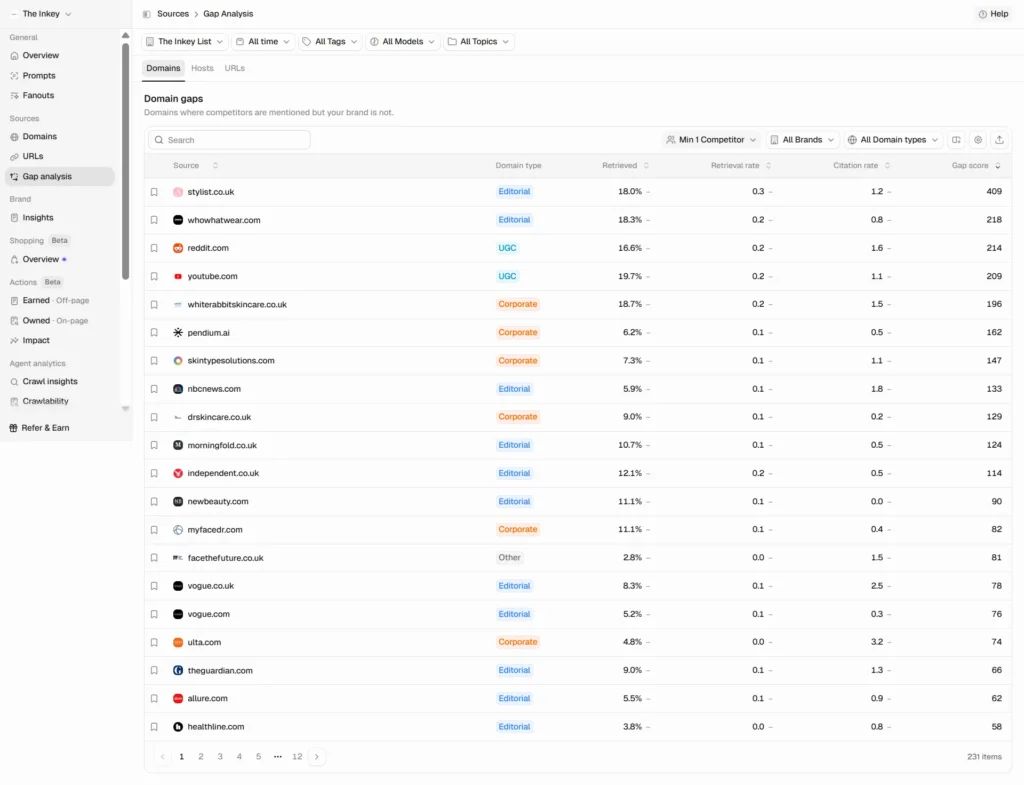
This is the sharpest tool in the product for pitching new work. Gap Analysis surfaces specific domains where competitors are cited and your tracked brand isn’t, ranked by a computed gap score. Stylist.co.uk came back with a gap score of 409 on this project, sitting ahead of whowhatwear.co.uk, reddit.com, and youtube.com. That’s not a vague insight, it’s a named editorial target with a number attached, the kind of thing that turns into a pitch slide without much extra work.
Brand
Insights
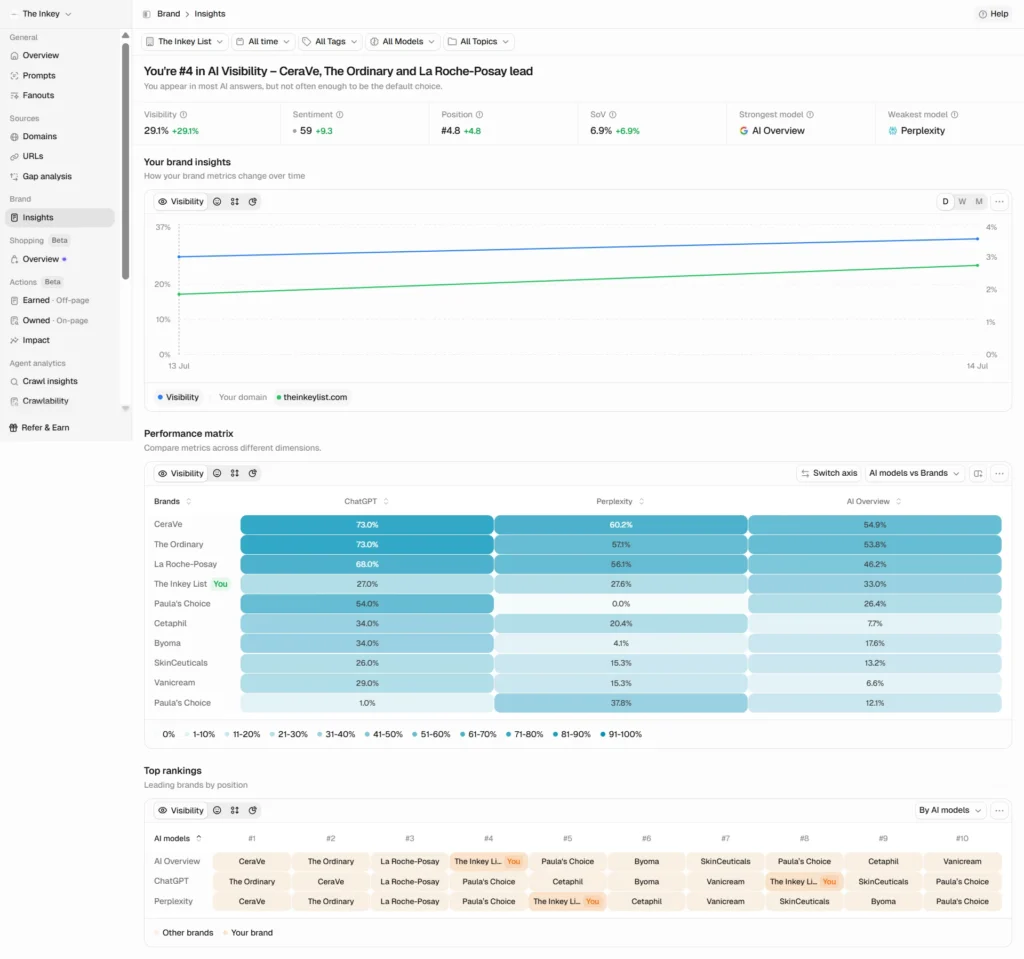
Where Overview shows the whole market, Insights is the same data narrowed to one brand. The Inkey List sat at 29.1% visibility, sentiment 59, average position #4.8, share of voice 6.9%, ranked #4 of the tracked brands, with Google AI Overview as its strongest model and Perplexity its weakest. CeraVe led the set at 63%, followed by The Ordinary and La Roche-Posay.
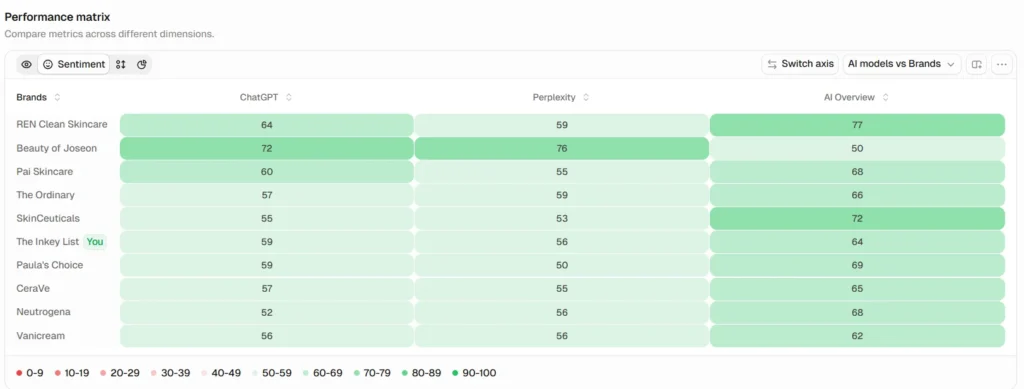
The performance matrix underneath is a heatmap of any two dimensions you pick, brand against model, brand against topic, and so on. Switched to sentiment instead of visibility, it’s a genuinely fast way to spot which engine is quietly carrying (or tanking) a brand’s tone, without reading a single chat.
Perception
Perception is a newer, early-access module, and it goes beyond a single sentiment score: it scores your brand against competitors on specific attributes, on a 0 to 100 scale where 100 means a brand is always mentioned first for that attribute, and shows the sources feeding each association. Once it finished its first run, the headline for this project was blunt: “AI sees The Inkey List as Cruelty Free Skincare, but not Results Driven.” Strongest attribute, Cruelty Free Skincare. Weakest, Results Driven. Leading on 3 of 5 tracked attributes. Strongest competitor on the attributes it doesn’t own, The Ordinary.
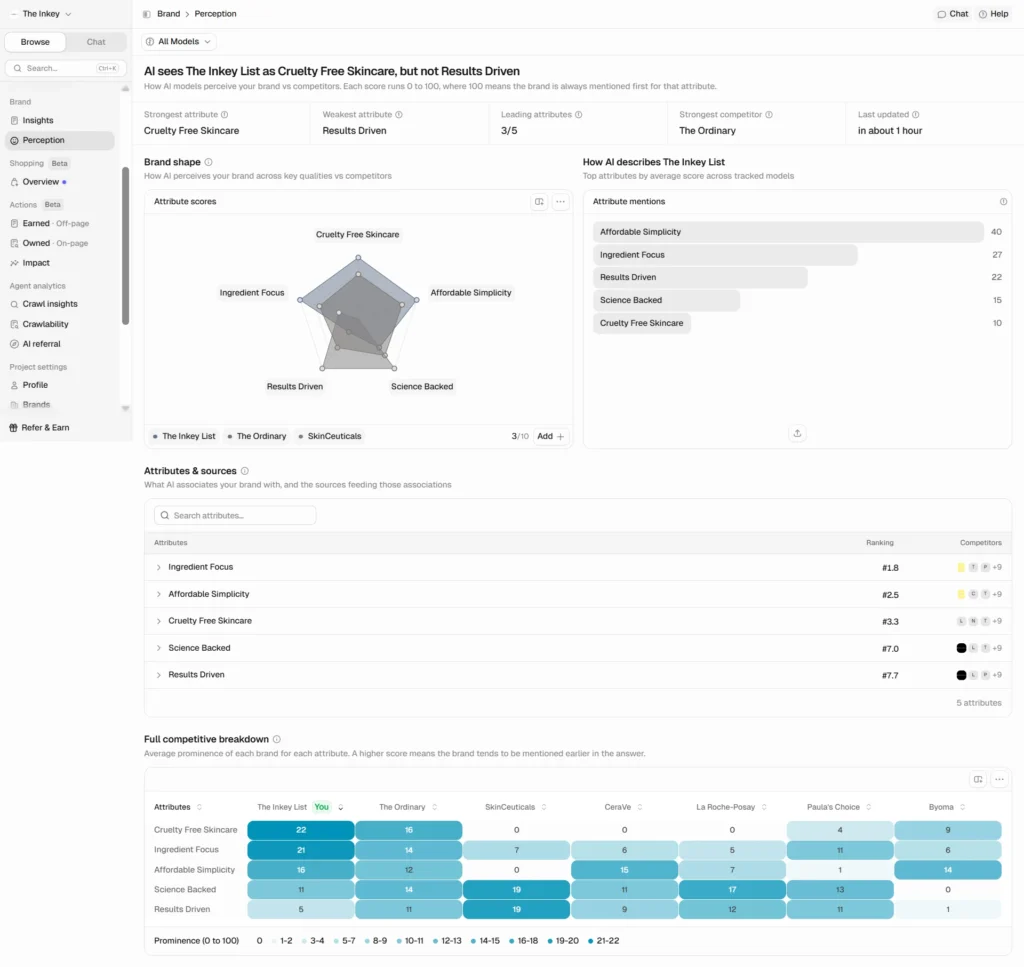
The attribute breakdown is where it gets genuinely useful. Across the tracked model set, The Inkey List led the competitive set on Cruelty Free Skincare (22 vs. The Ordinary’s 16 and Byoma’s 9, with three competitors at 0) and on Ingredient Focus (21 vs. 14). It also led on Affordable Simplicity. But on Results Driven, the attribute that arguably matters most for a skincare purchase decision, it scored 5, behind every competitor in the set, SkinCeuticals and The Ordinary both cleared 11 or higher. That’s a specific, actionable gap: the AI models have picked up plenty of signal that this brand is cruelty-free and ingredient-focused, and comparatively little that it actually works.
That finding lines up with something already flagged earlier in this review. Owned Actions came back empty on this same project because the domain wasn’t retrieved often enough as a citation source. Perception is now showing why that retrieval gap matters beyond just visibility: even where the brand does get mentioned, the content driving those mentions isn’t building a Results Driven association. Two different modules, same underlying signal, which is a good example of how the modules are designed to reinforce each other rather than sit in isolation.
Shopping
AI Shopping Analytics officially launched on 17 June 2026, giving e-commerce brands SKU-level visibility into how AI assistants recommend their catalogue: visibility, win rate, and position per product, tracked today against ChatGPT with other engines planned. You connect a catalogue through a Shopify domain, a Peec CSV, or a Google Merchant Center feed, and products go live within minutes, matched against 30 days of prior chat history so the metrics don’t start from zero.
I haven’t run this for a real client yet, so I’m not going to score it or give a hands-on opinion here. It’s still tagged Beta inside the product even though the public launch announcement treats it as shipped, a small inconsistency worth knowing about rather than a real problem. I’ll fold in a proper verdict once I’ve used it on an actual e-commerce account.
Actions
Earned (off-page)
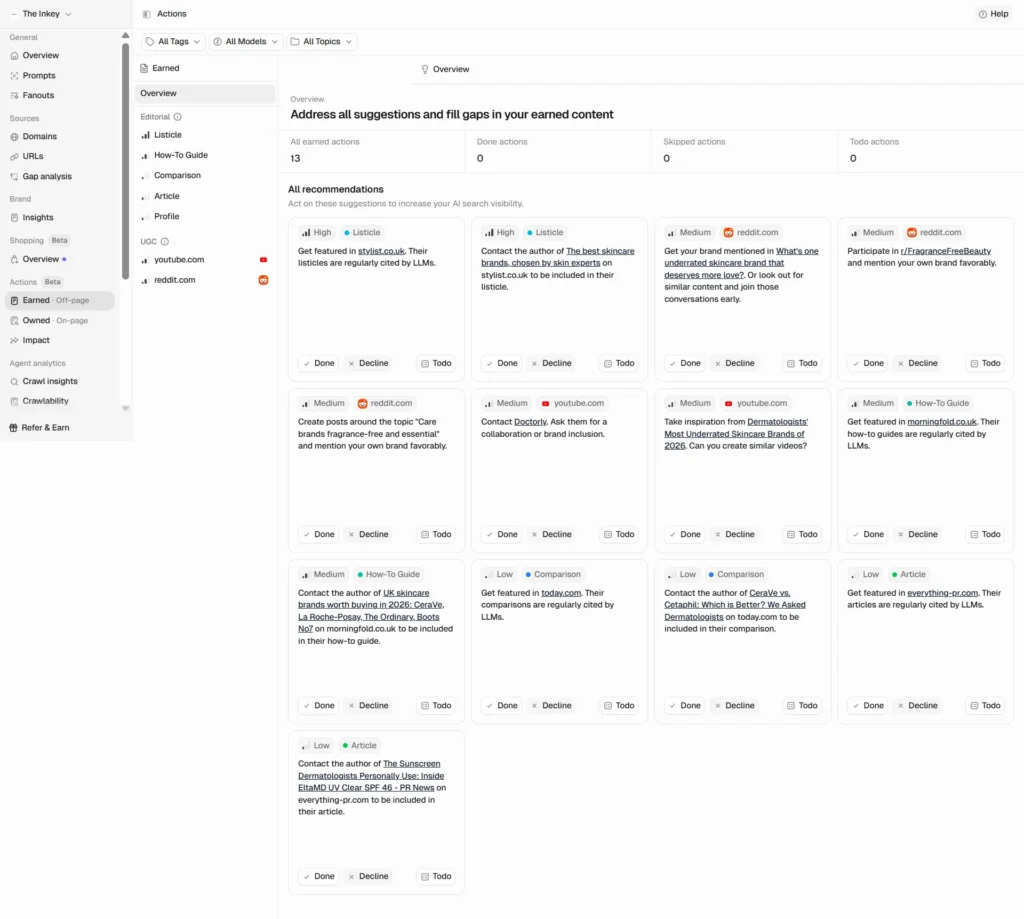
Earned turns gap data into a to-do list: 13 live recommendations on this project, each prioritised High, Medium, or Low, and each tied to a real source rather than generic advice. Examples from this benchmark included getting featured in a stylist.co.uk listicle, reaching out to the author of a Reddit thread about fragrance-free brands, and pitching a comparison article that already cites two competitors. Every recommendation carries a Done, Decline, or Todo status.
Owned (on-page) and Impact
Both of these were empty on my project, and rather than just flag that as a gap, it’s worth explaining why, because the explanation is genuinely useful. Peec’s own Chat agent (more on Chat below) traced it precisely when asked: the benchmark domain had only been retrieved as a citation source in 6 of 289 tracked chats, a 2.1% rate, nowhere near enough signal for the system to generate on-page recommendations, against 18 chats for a competitor’s corporate domain. Impact, in turn, has nothing to measure until an Owned or Earned action gets marked Done. Neither module is broken. They’re a closed loop, recommend, act, measure, that needs a real project with real history behind it, which a one-day-old benchmark simply isn’t.
Agent Analytics
Crawl Insights
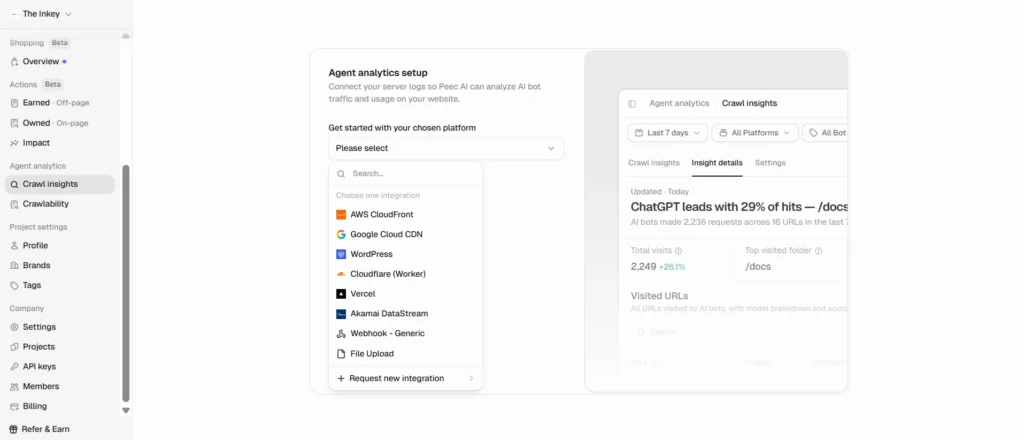
Crawl Insights shows actual AI bot traffic hitting a site, not just whether a brand gets cited in an answer. It supports 8 integration paths: AWS CloudFront, Google Cloud CDN, WordPress, Cloudflare Worker, Vercel, Akamai DataStream, a generic webhook, or a plain file upload, which is broader than “connect a live server” and more accessible for smaller teams without dedicated infrastructure. I couldn’t connect this on a neutral benchmark brand, since I don’t have legitimate log access to it, but the sample view shows what it looks like once it’s live: hits by bot, top visited folders, total visits.
Crawlability
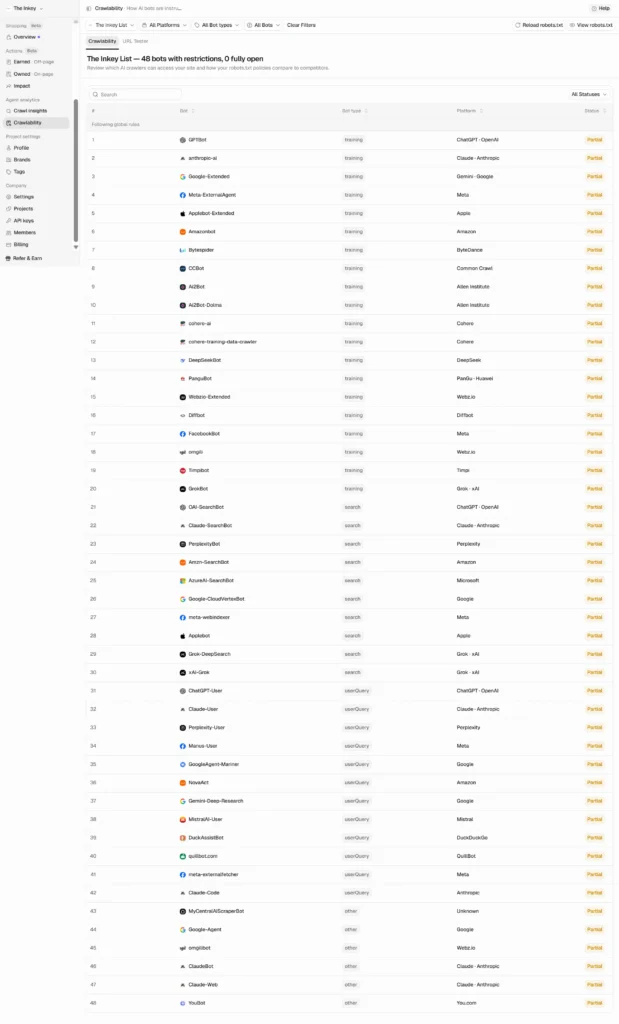
Crawlability parses a site’s live robots.txt against 48 known AI bots (GPTBot, anthropic-ai, Google-Extended, Amazonbot, Bytespider, and more) and reports per-bot access status. My benchmark domain came back with all 48 bots partially restricted and none fully open, which is exactly the kind of finding that’s easy to miss by eyeballing a robots.txt file manually and easy to catch here.
AI Referral
This is the newest module I found, still early access, so it isn’t broadly available yet. AI Referral connects to Google Analytics and shows actual human click-through traffic from each AI assistant, sessions, conversions, and landing pages, not just whether a brand was cited. Every other module in Peec answers “did the AI mention me.” This is the one that answers “did that mention send anyone to my site, and did they buy anything.” I didn’t connect a Google Analytics account to test it further, since that would mean linking a real client’s data rather than a neutral benchmark. Worth being accurate here: this isn’t unique to Peec, AthenaHQ and SE Ranking both offer their own GA4 integrations, but it’s still a genuinely small club, and most of the category (Otterly, Scrunch, Profound in its self-serve tier) stops at citation-level data without going all the way to sessions and conversions. See my full comparison of the other tools, or how to choose between them, if you’re weighing Peec against the rest of the field.
Chat
Chat is not a support widget bolted onto the product, it’s an actual in-app AI agent, and it’s also early access. Ask it a question about your own project and it plans a multi-step investigation, shows its reasoning as it works, and answers with real cited numbers pulled from live data rather than a canned response. I watched it diagnose the empty Owned Actions module unprompted and correctly, with the exact retrieval-rate numbers quoted above. It also has an “auto-approve actions” toggle, which suggests it can execute changes in the product directly, not just report on them.
For what it’s worth, Peec’s human support has historically been fast and on-point in my experience, quick replies, no runaround. Chat looks like it’s built to extend that same standard into something available at 2am, not replace it.
What’s behind the early access toggle
Four modules showed up once early access was switched on mid-review that weren’t visible on the first pass through the menu: Chat, Perception, AI Referral, and Prompt Builder. I don’t know whether Peec built these last week or last quarter, only that I hadn’t seen them before flipping that setting, and Peec’s own public changelog doesn’t mention any of the four, so their real ship dates aren’t publicly documented anywhere I could find. What the changelog does show is that this is a normal pattern for Peec, not a one-off: Brand Insights and Gap Analysis both graduated from early access to general availability earlier this year. If you’re evaluating Peec, check that toggle under company settings before deciding what it can and can’t do.
Before finishing this review I read through other write-ups of Peec to see if I’d missed something big or underweighted a real pain point. A few things stood out enough to mention here. Technically, Peec’s own documentation is upfront about a detail that explains a lot of what makes it feel different day to day: it reads AI answers by rendering the actual interface rather than relying only on official APIs. That matters because several of the models it tracks don’t expose citation or source data through their API at all, so an API-only tool simply couldn’t show what Domains, URLs, and Gap Analysis show here. It’s a real technical choice, not a marketing line.
A criticism I saw repeated elsewhere in the category, that these tools are monitoring dashboards and stop short of telling you what to actually do, is fair for some competitors but dated for Peec specifically. Actions (Earned, Owned, Impact, covered above) is built to close exactly that gap: prioritised, source-backed recommendations with a Done, Decline, Todo workflow, not just a chart.
One pain point other reviewers flagged that I didn’t run into myself: the model add-on pricing (extra models beyond the 3 included on Brand plans) reads as a meaningful markup once you add more than one or two, and that lines up with what I found pulling the numbers directly off the pricing page earlier in this review. And a fair caveat for very small, self-serve accounts: the onboarding flow I described is smooth at agency scale with a rep involved, but a solo user signing up alone without that guidance may find the model and project setup less obvious than it was for me.
Verdict
Peec is definitely a recommended tool. Over the months I’ve used it, it’s kept developing and improving at a fast pace, adding more and more useful reports and sections that help brands and marketers understand the AI landscape and optimise for it. Finding four early-access modules sitting behind a single toggle mid-review, months after I thought I already knew the product well, is a good example of that pace in practice.
| Category | Score (out of 5) |
|---|---|
| Ease of use | 5 |
| Setup speed | 5 |
| Metric depth | 5 |
| Competitor analysis | 5 |
| Coverage breadth (models) | 4 |
| Pricing and value | 4 |
| Customer support | 4 |
| Reporting and export | 3 |
| Overall | 5 |
Overall score: 5 out of 5.
Recommended for: small Amazon sellers, small-medium agencies, solo freelancers and consultants, and enterprise teams. There’s a plan shape for each of them, and none of them are a bad deal.
Top strength: ease of use and setup speed. A 25-prompt project came back fully populated with results in under 10 minutes.
Top weakness: reporting and export. Every section is exportable and generally clean, but raw CSV exports carry special characters that need cleaning up before they’re client-ready. The newer Excel report format doesn’t have that problem, but chat-log downloads are still CSV only, which is unwieldy given how much data a single project generates.
None of that changes the bottom line. Peec is the one tool in this whole roundup I’d already paid for before anyone asked me to review it, and that’s the most honest endorsement I can give it.
Next steps
If you’re an agency, start on the pricing-agencies page, not the main pricing page, or you’ll get quoted the wrong ladder. If you’re a single brand, Starter at €85 a month is enough to run a 25-prompt benchmark like the one in this review with room to spare. Either way, the fastest way to judge Peec for your own case is what I did here: pick prompts your actual customers would type, not generic category terms (see how to measure AI visibility properly for the full framework), and give it a few days of real data before drawing conclusions rather than judging off a single run, which is exactly why setting up a proper baseline matters.