
How to Choose an AI Visibility Tracking Tool
The questions to answer before you start trialling AI visibility tools — coverage, metrics, pricing tiers and the one feature most buyers forget to check.
Jul 5, 2026 · ~7 min readMost people choose an AI visibility tool the same way: they sign up for whichever one has the loudest LinkedIn presence that week, burn their one free trial finding out it doesn’t track the AI engine that actually matters to them, and start over with a worse impression of the whole category. It’s an expensive way to learn something you could have checked in five minutes.
Here’s my honest take: pricing is the question everyone starts with, and it should be closer to last. Coverage and metrics eliminate most of the field before price is even relevant — there’s no point comparing the cost of two tools if only one of them tracks the engine your customers actually use.
This guide walks through the five things to check before you start any trial, in the order that actually matters. It’s the same framework I use when I’m evaluating a tool for a client, condensed into something you can run through in about five minutes. If you haven’t already, it’s worth reading best AI visibility tracking tools first, since which category of tool you’re even choosing between changes which of these five questions matters most.
Key takeaways
- Check coverage before price — the AI engines a tool tracks matter more than what it costs.
- Citation and source tracking is the metric most buyers skip, and the one that tells you the most.
- A trial that requires a credit card up front is a minor red flag, not a dealbreaker, but it’s worth noticing.
- Pricing models vary (per-prompt, per-brand, per-seat) and the “cheap” tool on paper isn’t always cheap once you scale usage.
- Agencies and multi-brand users have one non-negotiable requirement solo brands don’t: genuine multi-brand support, not a workaround.
Start with coverage, not price
Which AI engines does it actually track?
“AI visibility” sounds like one thing. It isn’t. ChatGPT, Perplexity, Google AI Overviews and AI Mode, Gemini, Claude and Copilot all have different retrieval mechanisms, and a tool that tracks one well doesn’t automatically track the others well. Before anything else, check:
- Which engines are covered, and which specific model (ChatGPT coverage that means one older model isn’t the same claim as full current-model coverage)
- Whether Google AI Overviews and AI Mode are treated as one thing or two
- Whether the engines your actual customers use are in the list at all, not just the popular ones
In practice, coverage varies more than marketing pages suggest: Peec.ai and Profound track ChatGPT, Perplexity, Google AI Overviews and Gemini as standard; Otterly.ai’s standard coverage now spans ChatGPT, Google AI Overviews, Perplexity and Microsoft Copilot, with Claude, Gemini and Google AI Mode available as add-ons; Semrush’s AI Visibility Toolkit builds on its existing SERP infrastructure, which is convenient if you already use Semrush but worth checking against a dedicated tool if AI visibility is your main use case. Verify the current list for whichever tool you’re evaluating rather than trusting a broad “multi-engine coverage” claim.
What’s included in the trial versus locked behind a higher tier
This is the detail that burns people. Several tools cover six or more engines on their marketing page, then restrict the free tier or entry plan to two or three of them. Read the tier breakdown, not just the headline coverage claim, before you sign up.
Check which metrics you’ll actually use
Visibility score, mention count and share of voice — the basics
Every serious tool offers some version of these three. They’re useful as a baseline, but they’re also the easiest metrics to make impressive-looking without being especially informative on their own — a high mention count means nothing if you don’t know which of your competitors are also getting mentioned in the same answers.
Source and citation tracking — the one most buyers forget to check
If a tool doesn’t show you which specific pages the AI engine pulled from when it mentioned (or didn’t mention) your brand, you’re flying blind on the one thing that actually tells you what to fix. This is, in my view, the single most under-checked feature when people evaluate these tools, and it’s the difference between “we’re mentioned 40% of the time” and “we’re mentioned 40% of the time and here’s exactly which of our competitor’s pages keeps getting cited instead of ours.”
Peec.ai and Profound both surface source-level citation detail by default. Some SEO-suite extensions, like Semrush’s AI Visibility Toolkit, report mention counts without the same depth of citation detail, so confirm this specifically rather than assuming every tool on your shortlist covers it.
Sentiment, position and competitor comparison — nice to have, rarely a dealbreaker
Useful for a fuller picture once you’re established with a tool, but I wouldn’t let the absence of a polished sentiment feature rule out an otherwise good fit. Prioritise coverage and citation tracking first.
Test the setup and trial experience honestly
Three quick checks that tell you a lot about how the vendor treats new users. Tools like Peec.ai, Profound and Otterly.ai are worth using as your reference set when running through these checks, since they sit at different points on the setup-friction spectrum:
- Does it need a credit card to start? Not a dealbreaker on its own, but a tool confident in its free tier usually doesn’t need one.
- How long until you see real data? Same-day is normal for most of these tools. If you’re waiting days for a first scan, that’s worth factoring into how useful the trial period actually is.
- Is onboarding guided, or are you dropped in cold? A guided setup that walks you through picking prompts and competitors is a genuinely good sign for how usable the tool will be day to day, not just how it looks in a demo.
Understand the pricing model before you’re locked in
Per-prompt vs per-brand vs per-seat pricing — why this matters more than the headline price
The sticker price on a pricing page is close to meaningless until you know what it’s measured against. A tool priced per prompt tracked will scale in cost as you add competitors and query variations, sometimes faster than you’d expect. A tool priced per brand or per seat behaves completely differently at scale. Work out which model a tool uses before comparing its headline number to a competitor’s, run this check against the actual shortlist you’re considering, whether that’s Peec.ai, Profound, Otterly.ai, Semrush’s AI Visibility Toolkit, or others, rather than comparing list prices in the abstract.
What happens when you outgrow the entry tier
Entry tiers are sometimes a trap: generous enough to look great in a trial, then a steep jump to the next tier the moment your real usage kicks in. Check the second tier up, not just the first one, before you commit — that’s the price you’re actually likely to be paying in six months if the tool works.
The one feature agencies and multi-brand users need that solo brands don’t
If you’re tracking one brand, most of these tools work fine out of the box. If you’re an agency tracking several client brands, check specifically for genuine multi-brand or white-label support and client-ready reporting/export, not a workaround where you’re paying for and juggling several separate single-brand accounts. This is the single most common mismatch I see: agencies buying a tool built for a solo brand and then improvising a multi-client setup that was never really designed for it. If you’re evaluating options like Peec.ai or Profound for agency use, ask about white-label reporting and multi-client billing directly during the sales conversation, not after you’ve signed.
| If this is you… | …eliminate tools that |
|---|---|
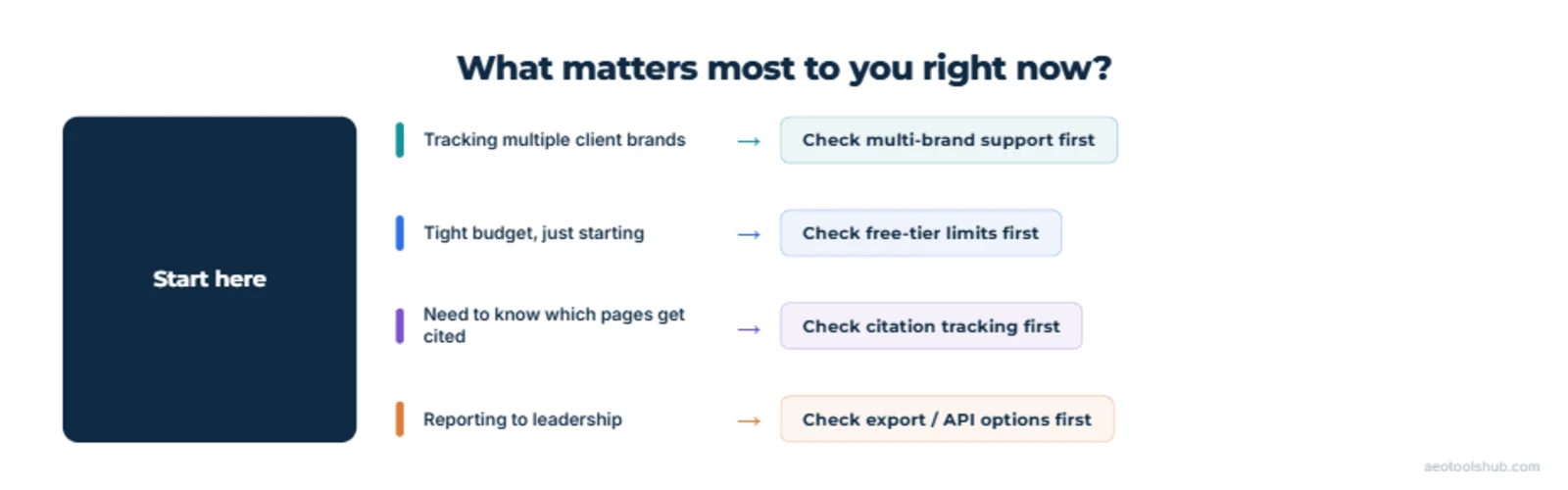
| Your audience is active on Perplexity | Eliminate tools that only track ChatGPT — older or narrowly-scoped extensions won’t show you the platform your buyers actually use. |
| You’re an agency managing multiple client brands | Eliminate tools priced strictly “per brand” with no multi-client or white-label reporting — you’ll end up improvising a setup the tool was never built for. |
| Your goal is guiding content strategy, not just tracking rank | Eliminate tools that don’t show the exact URL of a competitor’s citation — without the source, you can’t reverse-engineer why they got cited and you didn’t. |
A 60-second filter to run before you activate any trial — it won’t pick your tool for you, but it’ll cut the shortlist fast.
A five-minute checklist before you sign up for any trial
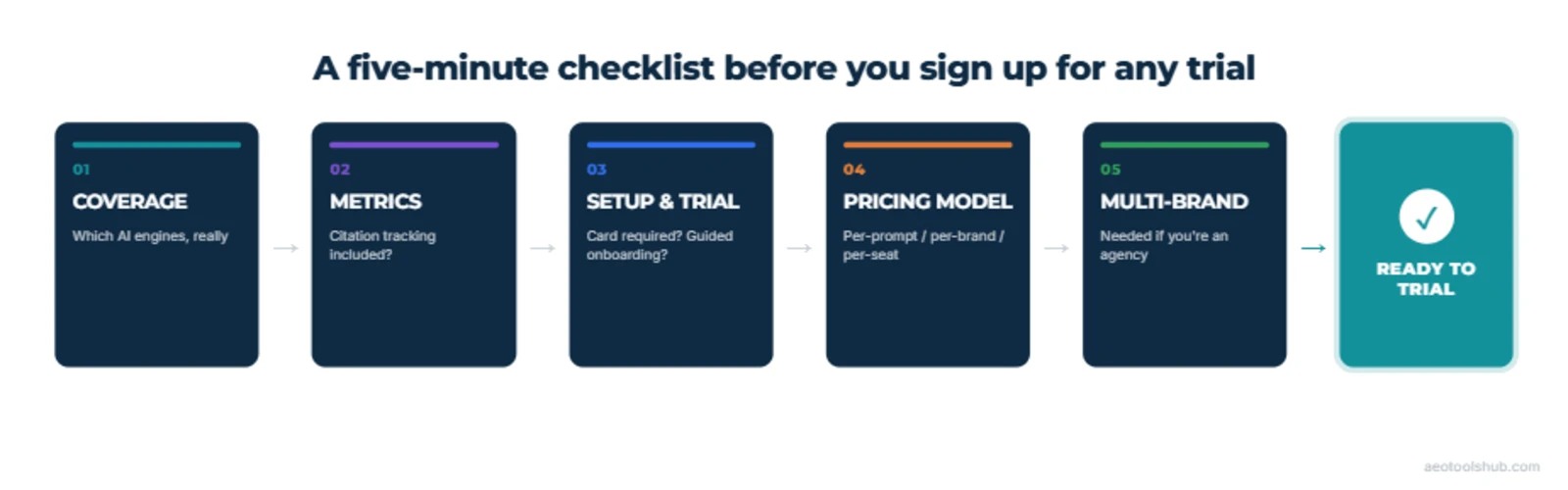
Before you hand over an email address for yet another trial, confirm:
- 1Coverage — the AI engines that matter to you are tracked in the tier you’d actually pay for, not just the top marketing tier.
- 2Metrics — citation/source tracking is included, not just visibility score and mention count.
- 3Setup & trial — no credit card required, and a realistic sense of how fast you’ll see real data.
- 4Pricing model — you understand whether you’re paying per prompt, per brand or per seat, and what the next tier up costs.
- 5Multi-brand support — confirmed explicitly if you’re an agency, not assumed.
Frequently asked questions
Should I trial more than one tool before committing?
If you’re choosing between two tools in the same category that both pass the checklist above, yes — run the same set of prompts through both during their trial periods and compare the citation-level detail directly. If one tool clearly fails coverage or metrics, there’s no need to burn a second trial confirming what you already know.
Is a free tier enough to make a real decision, or do I need a paid trial?
A free tier is usually enough to answer the coverage and metrics questions. It’s rarely enough to judge pricing fit at real usage volume, since free tiers cap prompt counts well below what ongoing tracking requires.
What questions should I ask a vendor before buying, if pricing isn’t public?
Ask what a typical account your size actually pays (not the headline enterprise number), what happens to pricing as you add prompts or brands, and whether there’s a pilot or shorter commitment available before a full annual contract.
How often should I re-evaluate the tool I’ve chosen?
Once a year is reasonable for most brands, sooner if your prompt volume, competitor set or the number of brands you’re tracking changes materially.
Can I switch tools later without losing historical data?
Usually not cleanly — most of these platforms don’t offer a standard export format for historical trend data, so treat your first choice as a real decision, not a trial you can costlessly reverse a year from now. Export what you can periodically regardless of which tool you’re on.
Next steps
Shortlist two tools before you trial anything, not one. Pick your category from best AI visibility tracking tools, then run the same prompts through two candidates in parallel — for example Peec.ai and Otterly.ai if you’re comparing dedicated platforms, or Semrush’s AI Visibility Toolkit if you already pay for that suite and want a sanity check against a dedicated tool. Comparing two side by side surfaces real differences in citation depth far faster than trialling one tool in isolation and hoping your gut reaction is reliable.
- Bring your own prompts to every trial — the ones your actual customers would ask, not the vendor’s demo query, since that’s the only way to see real coverage for your brand.
- Timebox the pricing question to the five minutes the checklist above takes — don’t let it become the reason you delay trialling entirely.
- If you manage more than one brand, ask about multi-brand pricing on the sales call before you start a trial, not after you’ve already invested time in one.
- Once you’ve picked one, measure it properly — how to measure your brand’s AI visibility and how to set up a baseline cover what to do with the data once the trial ends.